12 Cold Email Templates That Start Real B2B Sales Conversations (With Examples)
Get 12 practical cold email templates and examples for B2B sales. Learn what to write, how to personalize outreach, and follow up without sounding generic.

Most cold email templates fail for a simple reason.
They sound like templates.
You've probably received hundreds of them. The opening compliment about your LinkedIn profile. The vague observation about your company's growth. The three paragraphs explaining everything the sender's business does. And the closing question asking whether you have 15 minutes next Tuesday.
The problem isn't that the sender used a template.
The problem is that the email gives you no compelling reason to respond.
We build outbound systems for B2B companies, and one thing becomes clear when you start looking beyond activity metrics: the best-performing messaging frameworks usually give prospects a specific, relevant reason to engage.
Not a generic compliment. Not manufactured urgency. Not a long list of services.
Something that connects to a problem they might actually be trying to solve.
In this guide, we'll share 12 cold email templates for different B2B situations, explain when to use each one, and break down how to personalize them without turning every message into an hour-long research project.
These are illustrative templates, not claimed performance winners. Use them as starting points, test them with your own ICP, and adapt them to the evidence you have.
What Makes a Good Cold Email Template?
A good cold email template gives you a repeatable structure without forcing every prospect into the same message.
It should answer four questions:
- Why this company? What makes the account relevant to your offering?
- Why this person? Why does their role make them the appropriate contact?
- Why now? Is there a specific event, problem, or change that makes the conversation timely?
- Why respond? What useful next step are you offering?
The strongest templates don't necessarily include all four answers as separate sentences.
They simply make the relevance clear.
Consider this generic email:
"Hi Sarah, I came across your impressive company and wanted to introduce our AI-powered platform that helps businesses improve productivity. Are you available for a quick call?"
There is no specific business problem, no evidence of relevance, and no reason to prioritize the conversation.
Now compare it with:
"Sarah, noticed you're hiring three SDRs while expanding into enterprise accounts. Are you planning to keep account research and enrichment with the reps, or centralize that work? We've been helping sales teams automate the data preparation so reps can focus on conversations."
The second email gives the recipient something concrete to react to.
It also demonstrates an important principle: personalization is about relevance, not familiarity.
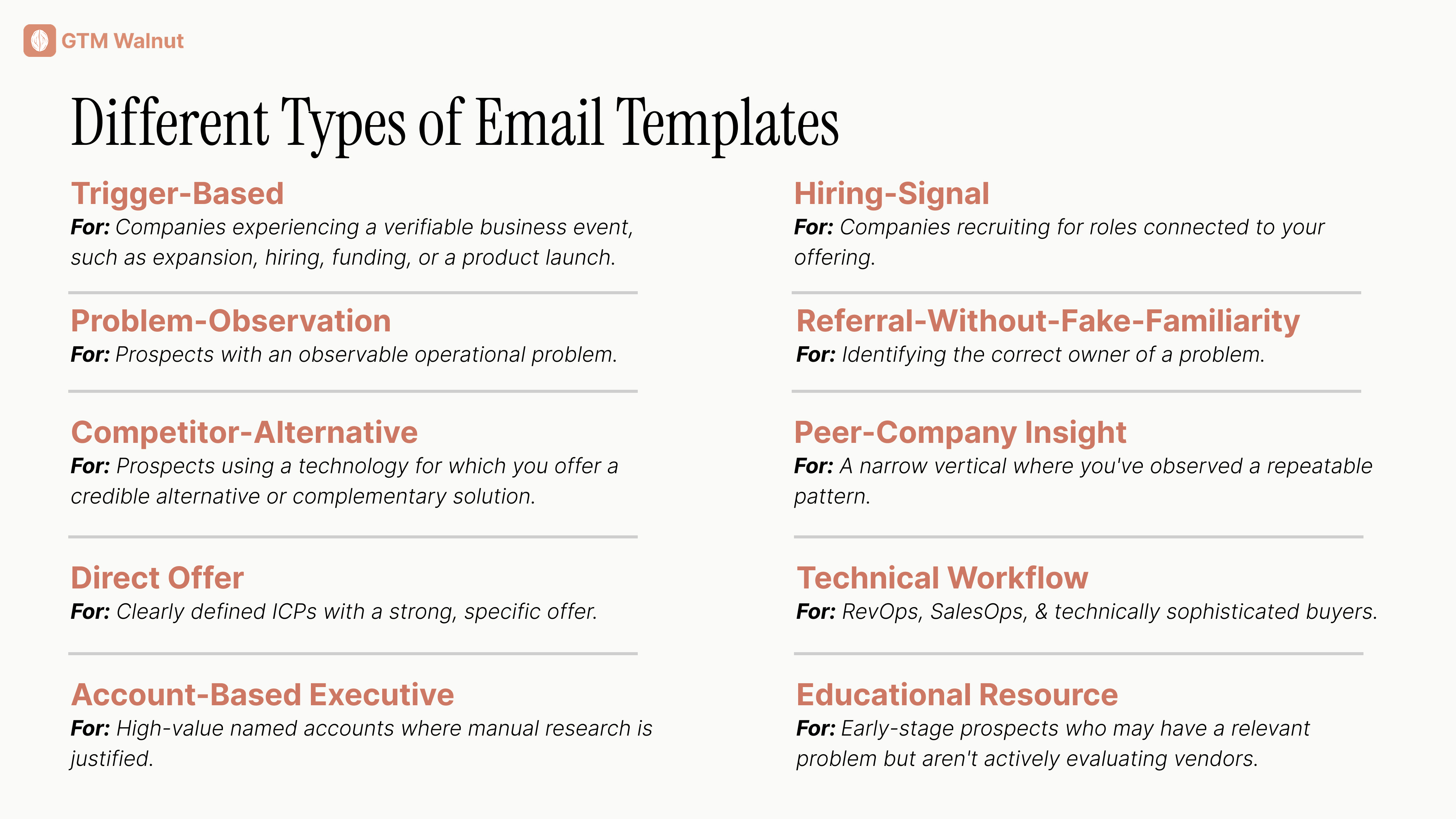
1. The Trigger-Based Cold Email Template
Best for: Companies experiencing a verifiable business event, such as expansion, hiring, funding, or a product launch.
Subject: Question about {{company}}'s {{initiative}}
Hi {{first_name}},
Saw that {{company}} recently {{verified_event}}.
When teams make this move, {{specific_operational_challenge}} can become harder to manage.
Are you handling {{related_process}} internally, or looking at ways to automate part of it?
We help {{relevant_company_type}} address that without adding more manual work for the team.
Worth comparing approaches?
{{sender_name}}
Why This Template Works
The trigger gives the email a relevant starting point.
You're not contacting the company simply because it matches your target industry. You're reaching out because something changed.
That change may create a business problem your offering addresses.
Example
A SaaS company announces expansion into Germany and France.
Instead of sending a generic lead generation pitch, a GTM services company could ask how the team plans to handle market-specific account discovery and contact enrichment.
Important: A trigger is not proof of intent. Funding, hiring, and expansion create hypotheses worth investigating. They don't automatically mean the company needs your product.
2. The Problem-Observation Cold Email Template
Best for: Prospects with an observable operational problem.
Subject: {{process}} at {{company}}
Hi {{first_name}},
Noticed {{specific_observation}}.
One challenge we often see in that setup is {{problem}}.
We help teams {{specific_improvement}} by {{brief_mechanism}}.
Is that something your team is already handling, or is it still on the roadmap?
{{sender_name}}
Why This Template Works
It leads with the prospect's situation rather than your service.
But the observation must be real.
You shouldn't pretend to know that a company's CRM data is messy, that their SDRs are struggling, or that they have a lead routing problem without evidence.
Instead, use observable information to frame a possibility.
For example, several lead capture forms routing into different systems may suggest an integration question. They do not prove that the integration is broken.
The wording should reflect that distinction.
3. The Competitor-Alternative Template
Best for: Prospects using a technology for which you offer a credible alternative or complementary solution.
Subject: Question about {{tool}}
Hi {{first_name}},
Noticed {{company}} uses {{tool}} for {{function}}.
We've been speaking with teams that want to keep their existing setup but improve {{specific_gap}}.
Our approach connects {{existing_system}} with {{complementary_capability}}, rather than requiring a full replacement.
Is improving that part of your workflow a priority this quarter?
{{sender_name}}
Why This Template Works
Switching costs are real.
Many cold emails fail because the sender assumes the buyer wants to replace a tool that may already be working.
This framework removes that assumption.
It is especially useful for integration platforms, GTM engineering services, and operational tools that complement an existing stack.
Avoid claiming a competitor is failing unless you have credible evidence.
4. The Hiring-Signal Template
Best for: Companies recruiting for roles connected to your offering.
Subject: Your {{role}} hiring plans
Hi {{first_name}},
Saw you're hiring for {{specific_role}}.
Curious whether the new hire will own {{related_process}}, or whether you're looking to automate the repetitive parts before they join.
We help {{company_type}} handle {{specific_task}} through {{brief_solution}}.
Happy to share what that setup looks like if useful.
{{sender_name}}
Why This Template Works
A job description often provides useful information about an organization's priorities.
If a company is hiring RevOps engineers, for example, the description may mention CRM automation, enrichment, integrations, and routing.
That gives you specific language for your message.
But don't treat hiring as a guaranteed budget signal.
The company may prefer hiring, outsourcing, automation, or a combination. Your email should start a conversation rather than assume the decision has already been made.
5. The Educational Resource Template
Best for: Early-stage prospects who may have a relevant problem but aren't actively evaluating vendors.
Subject: {{topic}} resource
Hi {{first_name}},
We're seeing {{relevant_problem}} come up frequently with {{peer_group}}.
We put together a practical breakdown of {{specific_topic}}, including {{useful_detail}}.
Thought it might be relevant given {{verified_context}}.
Would it be useful if I sent it over?
{{sender_name}}
Why This Template Works
You're offering something that may be useful without requiring a sales meeting.
That can be appropriate when the recipient is early in the buying journey.
However, the resource needs substance.
A thin promotional PDF presented as a helpful guide won't create much trust. The content should answer a real operational question.
6. The Peer-Company Insight Template
Best for: A narrow vertical where you've observed a repeatable pattern.
Subject: Something we're seeing in {{industry}}
Hi {{first_name}},
We've noticed a recurring issue among {{specific_company_segment}}.
As {{relevant_change}} happens, {{operational_problem}} becomes more difficult to manage.
We've been working on approaches that {{specific_solution}}.
Is this something {{company}} is dealing with too?
{{sender_name}}
Why This Template Works
The message uses a relevant industry insight as the entry point.
It doesn't require revealing confidential customer data or inventing results.
The insight needs to come from actual experience or credible research, not a generic statement such as "companies are struggling to grow."
7. The Direct Offer Template
Best for: Clearly defined ICPs with a strong, specific offer.
Subject: {{specific_outcome}} for {{company}}
Hi {{first_name}},
We help {{company_type}} solve {{specific_problem}} through {{specific_process}}.
That usually involves {{one_or_two_relevant_steps}}, without {{common_unwanted_tradeoff}}.
Would exploring that be relevant for {{company}} right now?
{{sender_name}}
Why This Template Works
Some teams overcomplicate personalization.
If the problem is common, the offer is clear, and the audience is tightly defined, a direct message can be more useful than forced research-based opening lines.
The key is specificity.
"Improve your sales process" is vague.
"Automatically verify and enrich contacts before they enter your SDR sequences" explains an actual workflow.
8. The Technical Workflow Template
Best for: RevOps, SalesOps, and technically sophisticated buyers.
Subject: {{system_a}} to {{system_b}}
Hi {{first_name}},
Are you currently moving {{data_type}} between {{system_a}} and {{system_b}} manually?
We've been building workflows that handle {{specific_operation}} automatically, including {{important_exception_or_control}}.
I can send over a simple architecture example if that would be helpful.
{{sender_name}}
Why This Template Works
Technical buyers often want to understand how something works.
A workflow-specific opening may be more relevant than broad revenue promises.
This template is useful for conversations involving Clay, n8n, HubSpot, Attio, and other integrated GTM systems.
Only reference systems you have verified the company uses.
9. The Account-Based Executive Template
Best for: High-value named accounts where manual research is justified.
Subject: {{strategic_initiative}} at {{company}}
Hi {{first_name}},
From {{public_source}}, it looks like {{company}} is prioritizing {{strategic_initiative}}.
One question that raised for us is how you're approaching {{related_business_constraint}}.
We work with {{relevant_buyer_type}} on {{specific_capability}}, particularly when {{relevant_context}}.
Would it make sense to compare notes on how you're handling this?
{{sender_name}}
Why This Template Works
This is less about a clever opening line and more about a well-researched business hypothesis.
For strategic accounts, the research should go beyond the company's homepage.
Look at leadership statements, job postings, product announcements, customer segments, and public strategic priorities.
The result should be one coherent observation, not five loosely connected facts stuffed into a message.
10. The Referral-Without-Fake-Familiarity Template
Best for: Identifying the correct owner of a problem.
Subject: Right person for {{process}}?
Hi {{first_name}},
I'm trying to find who owns {{specific_process}} at {{company}}.
We help {{relevant_team}} with {{clear_problem_and_solution}}.
Is that something you oversee, or would another person be better to speak with?
{{sender_name}}
Why This Template Works
You don't always know the correct buyer.
Rather than pretending you do, this template asks directly.
It works best when the responsibility is specific. Asking who owns "growth" is broad; asking who owns outbound enrichment and CRM lead routing is much clearer.
Never invent a referral or imply a colleague suggested you contact someone unless that actually happened.
11. The Value-Added Follow-Up Template
Best for: Following up after a first message when you have something genuinely useful to add.
Subject: Re: {{original_subject}}
Hi {{first_name}},
One additional thought on {{original_topic}}.
{{specific_insight_or_practical_example}}
It may not be a priority right now, but I thought the distinction could be relevant to {{company}}.
Happy to share more detail if useful.
{{sender_name}}
Why This Template Works
A follow-up should add context, not simply announce that you are following up.
Messages that say "just bumping this" or "bringing this to the top of your inbox" rarely help the buyer understand the value.
A useful follow-up can introduce a technical example, a relevant decision framework, or a clarification of the original offer.
12. The Final Follow-Up Template
Best for: Closing a sequence respectfully.
Subject: Re: {{original_subject}}
Hi {{first_name}},
I'll close the loop here since I haven't heard back.
If {{specific_problem}} becomes a priority later, happy to reconnect.
Either way, no need to respond.
{{sender_name}}
Why This Template Works
It makes the conversation easy to leave.
The purpose isn't to manufacture scarcity or guilt the prospect into replying.
Some prospects aren't interested. Others aren't in the market. Some simply don't want another sales conversation.
Your system should respect that.
How to Personalize Cold Email Templates at Scale
The wrong approach is to ask AI to write a completely unique message for every prospect using whatever information it finds online.
That often produces long, inconsistent emails with questionable claims.
A better approach is to separate research, qualification, and messaging.
Step 1: Define the Target Account
Start with industry, company size, geography, technology stack, buying roles, and other ICP requirements.
Don't personalize accounts that should never have entered the campaign.
Step 2: Identify a Relevant Signal
Choose a signal connected to your offering.
Examples include a specific hiring initiative, a new product launch, a technology change, or verified interest in a relevant topic.
Not every signal means buying intent. The purpose is to improve timing and relevance.
Step 3: Build a Message Hypothesis
Translate the signal into a reasonable business question.
For example:
Observed event: The company is recruiting six enterprise account executives.
Possible implication: Sales operations may need to support more account research and prospect data preparation.
Relevant offering: Automated account enrichment and outbound workflow orchestration.
Message angle: How is the team planning to support prospecting as the enterprise sales organization grows?
This is significantly better than simply inserting the hiring announcement into a generic pitch.
Step 4: Select a Template
Use the framework that fits the situation.
A trigger-based message works for a verified event. A technical workflow message works for operational buyers. A direct offer works when the audience and problem are already clear.
Step 5: Validate Before Sending
Check that company names, job titles, technical assumptions, public events, and personalization claims are accurate.
AI-generated messages should never be treated as automatically factual.
For important accounts, human approval is worth the effort.
This research-to-message workflow is part of the broader GTM engineering approach: connecting enrichment, signal detection, qualification, and outbound execution rather than treating email copy as an isolated task.
Cold Email Subject Lines: What Actually Matters?
Subject lines are useful when they communicate a relevant topic without misleading the recipient.
Examples include:
- Question about {{initiative}}
- {{process}} at {{company}}
- Your {{role}} hiring plans
- {{system_a}} and {{system_b}}
- A thought on {{strategic_priority}}
- Right person for {{specific_process}}?
Avoid fake reply prefixes, deceptive urgency, misleading claims, and personal details that are irrelevant to the offer.
The goal is not to trick someone into opening an email.
It's to make the subject understandable to the person receiving it.
How Long Should a Cold Email Be?
There's no universally optimal word count.
But if a prospect has to read four paragraphs before understanding why you're contacting them, the email is probably doing too much.
For an initial B2B outreach message, we generally recommend starting with a short structure:
Context → Relevant problem or observation → Specific offer or question
Aim to communicate one idea clearly.
Don't include every service you offer, your entire company history, three case studies, and multiple calls to action.
If the recipient wants the details, the conversation can continue.
How Many Follow-Ups Should You Send?
The number should depend on relevance, buyer experience, engagement, and applicable rules.
For testing, a modest sequence of an initial email and two or three thoughtful follow-ups can be a reasonable starting point.
That is a testing suggestion, not a universal performance benchmark.
Make each subsequent touch useful.
Don't repeatedly send the same pitch with slightly different wording.
Stop the sequence when the prospect replies, opts out, or otherwise indicates that the outreach is unwelcome.
A CRM-integrated suppression system should prevent another salesperson or campaign from contacting the same person after an opt-out.
Cold Email Mistakes That Templates Cannot Fix
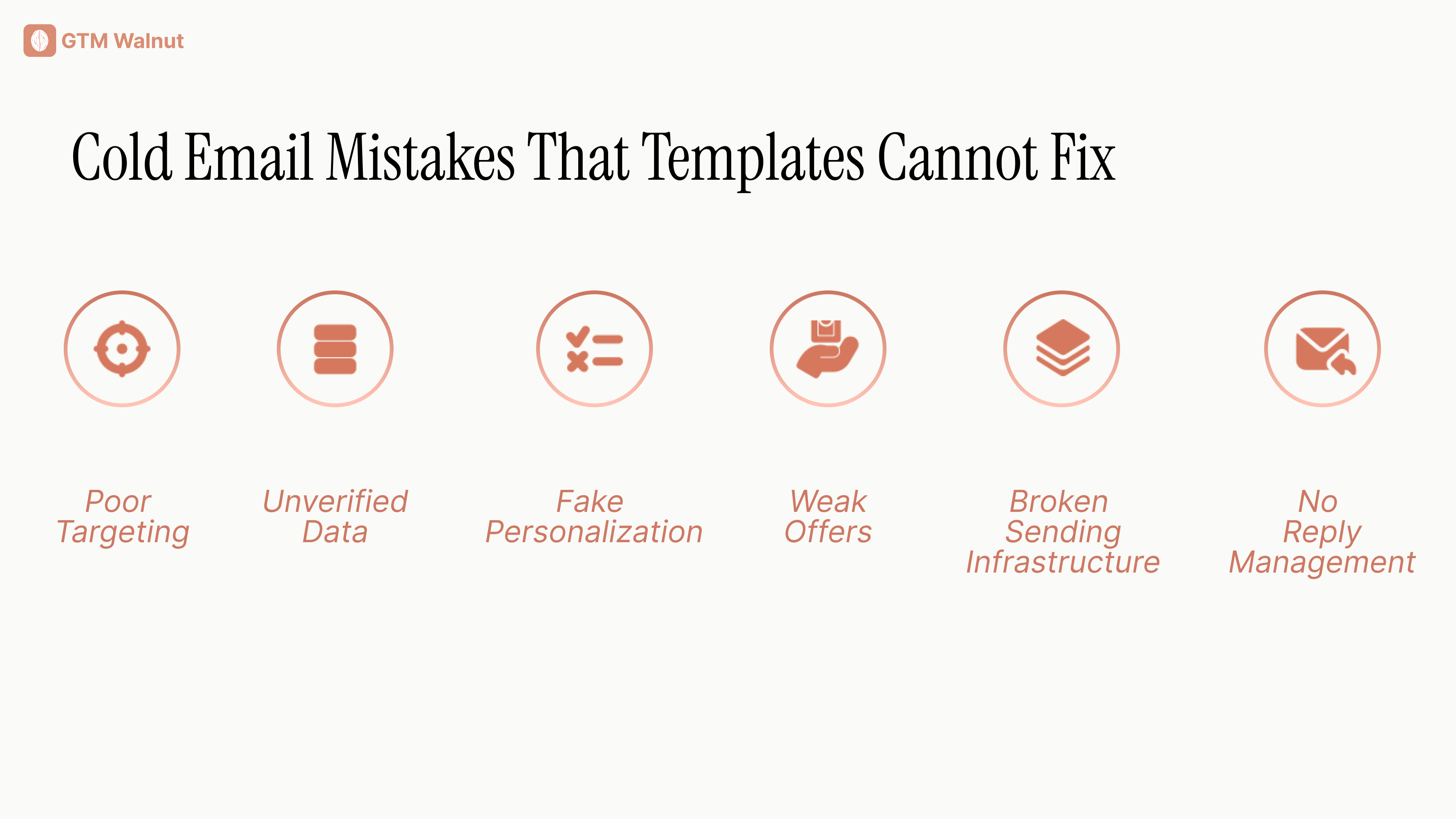
Poor Targeting
Even excellent copy won't help if the recipient has no connection to the problem you're solving.
Unverified Data
Wrong names, outdated job titles, and invalid email addresses create avoidable problems.
Fake Personalization
Claiming you read an article, attended an event, or noticed a business issue when you didn't damages credibility.
Weak Offers
"Let's connect and explore synergies" doesn't explain what the conversation is about.
Broken Sending Infrastructure
Poor authentication, excessive sending, and high complaint rates can undermine otherwise relevant messaging.
Google's sender requirements include SPF or DKIM authentication for senders to personal Gmail accounts, with additional authentication and unsubscribe requirements for bulk senders.
No Reply Management
A prospect who says they're interested should not receive another automated first-touch email three days later.
A prospect who opts out should not reappear in another campaign.
For a deeper technical breakdown, see our cold email deliverability guide.
How to Test Cold Email Templates Properly
Changing subject lines every few days without controlling for list quality tells you very little.
Start with a clearly defined segment.
Use comparable target accounts, the same underlying offer, and similar sending conditions.
Then test one meaningful variable at a time.
You might compare a trigger-based opening against a direct problem statement.
Or a resource offer against a question about the prospect's current workflow.
Measure replies, but don't stop there.
Track:
- Positive reply rate.
- Qualified conversations.
- Meetings held.
- Opportunities created.
- Negative response and opt-out rates.
- Performance by account segment.
A template that attracts curiosity but produces no qualified pipeline isn't necessarily the better template.
At GTM Walnut, our approach is to connect messaging experiments to the underlying prospect data, signal sources, and CRM outcomes.
That lets teams understand not just which sentence generated a reply, but which account characteristics and signals were associated with meaningful sales opportunities.
Good Cold Email Templates Start With Good Research
A template is useful because it creates consistency.
It helps teams produce clear messages without starting from a blank page every time.
But the real advantage comes from knowing which accounts to contact, why they're relevant, and what business problem the message should address.
Start with a strong ICP. Use accurate prospect data. Identify meaningful context. Select a message framework that fits the situation. Keep the copy short enough to understand quickly.
Then measure whether the resulting conversations turn into real sales opportunities.
If you need the broader strategy, read our complete cold email guide. For campaign execution tools, see our best cold email software comparison.
For teams that want research, enrichment, messaging, distribution, and CRM workflows connected rather than managed as separate tasks, GTM Walnut builds client-owned outbound systems with human oversight.
The best template depends on your prospect and reason for reaching out. Trigger-based templates suit timely business events, problem-observation templates work when you have evidence of a relevant issue, and direct offers work well for tightly defined audiences. The key is explaining relevance clearly.
Start with a specific reason for contacting the person, connect it to a relevant problem or opportunity, and ask one straightforward question. Avoid generic compliments, long product descriptions, misleading claims, and multiple calls to action.
Keep it long enough to communicate the context, value, and next step, but short enough to scan quickly. Many initial emails can make their point in roughly 60 to 120 words, although more complex situations may require additional detail. Test your own audience rather than treating a word count as a fixed rule.
Yes. AI can help with research summaries, message variants, and drafting. But AI-generated personalization may introduce unsupported claims or inaccurate details. Verify the underlying information and use human review, especially for high-value accounts.
Commercial email must comply with the rules applicable to the recipient and sending activity. US CAN-SPAM requires a clear opt-out mechanism, while mailbox providers impose additional rules for certain categories of bulk messages. Making it easy to opt out is also good operational practice.
GTM Walnut is an AI-native GTM engineering partner that builds the full B2B marketing and pipeline infrastructure for Seed to Series C companies. Unlike traditional B2B marketing agencies that run campaigns on their own systems, GTM Walnut implements the entire stack on your infrastructure: content and AI SEO for inbound pipeline, outbound automation for signal-triggered outreach, CRM RevOps for pipeline attribution, and intent signal capture to surface in-market accounts before they fill out a form.
Clients have generated $15M+ pipeline in eight months, 450+ MQLs in 14 months, and 270+ SQLs in nine months across different verticals. The system is yours to own and operate from day one, which means you build a compounding pipeline asset rather than a recurring agency dependency. Book a 30-minute system audit to see what the build looks like for your ICP and stage.
Fixed monthly retainer, starting at $2,500/month and scaling with scope. Most engagements land between $2,500 and $6,000/month depending on email volume, channel mix, geos, and whether CRM/RevOps work is included.
We don't do pure outcome-based pricing because infrastructure, list building, and messaging cost the same regardless of meetings booked, and outcome-only models tend to push agencies toward shortcuts that wreck your domain. We do stand behind the outcomes we forecast in the proposal; it's just not the billing mechanism.
Soumya is a B2B SaaS GTM and demand-generation leader who has built multi-million-dollar pipelines for early-stage and growth companies. She led GTM programs at Y Combinator and now runs GTM Walnut, an AI-native revenue infrastructure firm working with 40+ B2B SaaS and services teams.